
Download PIYO Pedometer – step counter, fitness tracker, lifestyle app
Overview
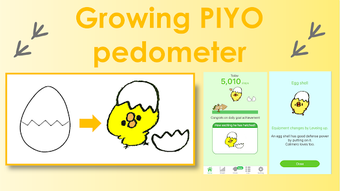
PIYO Pedometer is a lifestyle-focused mobile application designed to help users track daily physical activity through step counting, distance measurement, and calorie expenditure. Developed by Kazuyuki Ishida, the app is available for free on the Google Play Store and targets individuals seeking a simple, engaging way to stay active. Its primary purpose is to encourage consistent movement by combining fitness tracking with gamified elements, such as a growing chick character that evolves with user progress.
This unique visual feedback mechanism aims to increase motivation and promote long-term engagement with fitness habits. The app integrates with Google Fit to access step data, ensuring accurate tracking without requiring users to manually input activity. It is particularly suited for casual users, fitness beginners, and those who enjoy light gamification in health tools.
Real-world use cases include daily step goal setting, monitoring walking or running progress, and visualizing trends over time through built-in graphs. The app also subtly introduces elements of Japanese culture through its mascot, offering a cultural touch that enhances user experience beyond standard fitness tracking.
Key Features & Capabilities
- Step and Distance Tracking: Automatically records daily steps and calculates walking/running distance using Google Fit integration.
- Cute Chick Growth Mechanism: A visual mascot that grows and evolves based on daily logins, step achievements, and reward-based video completion.
- Calorie Burn Estimation: Estimates calories burned based on user activity, leveraging data from Google Fit.
- Progress Visualization: Provides step graphs to help users monitor trends and improvements over time.
- Goal Setting and Motivation: Encourages consistent use through daily login rewards and milestone-based unlocking of new chick stages.
These features work together to create a lightweight yet motivating fitness experience. For example, users can set daily step goals and receive visual feedback when they succeed, reinforcing positive behavior. The chick’s growth serves as a non-intrusive reward system, ideal for users who prefer gentle encouragement over aggressive notifications.
The integration with Google Fit ensures data accuracy and reduces the need for manual input. Progress graphs allow users to identify patterns in their activity levels, supporting informed adjustments to daily routines. This combination of tracking, visualization, and gamification makes PIYO Pedometer suitable for individuals aiming to build sustainable habits without overwhelming complexity.
User Interface, Workflow & Performance
The user interface of PIYO Pedometer is designed with simplicity and visual appeal in mind. The layout centers around the chick mascot, which is prominently displayed and changes appearance as users achieve milestones. Navigation is intuitive, with key metrics such as step count, distance, and calories displayed in a clean, easy-to-read format.
Users can access historical data and graphs through a straightforward menu system. The workflow is streamlined, requiring minimal interaction to view current stats or check progress. Since the app relies on Google Fit for data collection, it operates in the background with minimal user input.
Performance observations are based on general software behavior patterns. The developer did not specify resource usage details. Stability appears consistent with typical lightweight Android apps, though actual performance may vary depending on device and system conditions.
Battery and memory impact were not disclosed. The app is designed for continuous background operation without significant disruption to other tasks.
Compatibility & System Requirements
PIYO Pedometer is designed for Android devices and is available on the Google Play Store. The app’s compatibility with specific Android versions was not provided. Installation size information is not specified.
The developer did not list exact system requirements. Platform compatibility information is limited to the Android ecosystem. Users should ensure their device supports Google Fit services for full functionality.
Hardware requirements are not detailed. The app may not function properly on devices without access to Google Play Services or compatible sensors. For users on non-Android platforms, alternative solutions would be required.
The developer did not indicate support for iOS or other operating systems.
Pros and Cons
Pros
- Free to download and use with no in-app purchases mentioned
- Simple, visually appealing interface with a unique chick mascot
- Integrates seamlessly with Google Fit for accurate step tracking
- Encourages daily engagement through gamified growth mechanics
- Provides visual progress tracking via graphs and milestones
Cons
- No support for iOS or other platforms beyond Android
- Reliance on Google Fit may limit functionality on devices without access to the service
- Exact performance and system resource usage details were not provided
- Limited customization options for tracking goals or data display
- Visual rewards may not appeal to users seeking advanced fitness analytics
FAQ Section
Is PIYO Pedometer available for iOS devices?
PIYO Pedometer is currently only available for Android. The developer did not provide information on iOS compatibility.
Does the app require internet access to function?
The app uses Google Fit for data tracking, which may require internet access for synchronization. However, basic step tracking can occur offline. The exact dependency on internet connectivity was not specified.
Is PIYO Pedometer safe to use?
As a free app from the Google Play Store, PIYO Pedometer is available through an official platform with standard security checks. No specific security features were mentioned by the developer.
How often does the app update?
Update frequency was not disclosed. Users should check the Google Play Store for the latest version.
Can I use PIYO Pedometer offline?
While the app can track steps locally, full functionality—such as syncing with Google Fit—may require internet access. Offline usage capabilities are limited to basic data collection.
Final Thoughts
PIYO Pedometer stands out in the crowded fitness tracker market by blending simple step counting with a charming, gamified experience. Its core functionality—tracking steps, distance, and calorie burn—is reliable thanks to Google Fit integration. The unique chick growth system adds a layer of motivation that appeals to users who enjoy light, visual rewards.
While the app lacks advanced analytics or cross-platform support, it delivers a focused, user-friendly experience ideal for beginners or casual users. The absence of in-app purchases and its free availability enhance its accessibility. For those seeking a low-pressure way to stay active, PIYO Pedometer offers a refreshing alternative to complex fitness apps.
It combines utility with personality, making daily movement feel more rewarding. Download PIYO Pedometer now.







